Context window management
Learn how Bob's 270,000-token context window works, how each category contributes to token usage, and best practices for keeping tasks focused and cost-efficient.
Understanding the context window
Each task in the chat panel has a context window, which is the token budget for that conversation thread. The cap is 270,000 tokens. Everything Bob loads counts against it.
What fills the context window
Hover over the token usage indicator in the top-right of the chat panel to see a breakdown of what is consuming your context window:
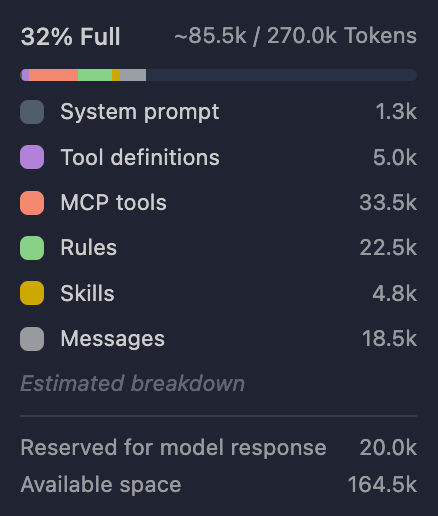
| Category | What it includes |
|---|---|
| System prompt | Bob's core instructions for the session |
| Tool definitions | Built-in tool schemas and connected MCP tool definitions |
| MCP Tools | Instructions and descriptions for tools provided by connected MCP servers |
| Rules | Custom instructions from project and mode rule files (for example, AGENTS.md or .bob/rules-*) |
| Skills | Instructions from skills Bob loaded for the conversation |
| Messages | Your prompts, Bob's replies, and tool activity in the conversation. This is the transcript counted as tokens. |
@ mentions, command output, and tool results all count toward Messages. File contents do not appear as a separate line.
Under Estimated breakdown:
- Reserved for model response: Tokens held back for Bob's next reply (typically 20.0k).
- Available space: Remaining free tokens.
Baseline overhead
Fixed categories consume tokens before you begin working with Bob. On the Galaxium Travels sample project, even a prompt as short as "Quickly say hi back." totals approximately 8.5k tokens. Most of that is Tool definitions (5.1k), System prompt (1.5k), Rules (830), and Skills (454). Only 590 tokens are in Messages.
Bob re-sends the full overhead stack on every prompt. Adding more MCP servers or loaded skills increases MCP Tools, Tool definitions, and Skills before you type a single word.
For hands-on numbers and a reset walkthrough, see Create a new context window.
Monitoring token usage
The token usage indicator shows the percentage full and a used/total fraction against the 270,000-token cap. Click it to open the context window breakdown. Check which category is growing.
The following table shows what causes each category to grow:
| Category | What makes it grow |
|---|---|
| System prompt | Loaded when the task starts. Stays flat during normal work. |
| Tool definitions | Built-in tool schemas. Set when the task starts. Stays flat during normal work. |
| MCP Tools | Connected MCP servers and enabled tools. Grows when you add servers or tools, not when you send prompts. |
| Rules | Project and mode rule files (for example, AGENTS.md). Set when the task opens. |
| Skills | Skills Bob loads for the task. Can increase if Bob activates a skill mid-thread. |
| Messages | Your prompts, Bob's replies, file reads, tool output, and @ mentions. Grows with every turn and with repository exploration. |
In a short exchange, fixed categories often account for most of the total. When you ask Bob to read files or run tools, Messages typically becomes the largest category. Watch for this shift.
Available space shrinks as any category grows. Reserved for model response is set aside for Bob's next reply and is not part of the used total shown above it.
For measured examples on a real repository, see Create a new context window.
Token limits
The hard cap is 270,000 tokens per task. Bob starts compacting before you reach the limit. Compaction typically begins around 190,000 tokens of total usage.
Automatic context compaction
At the compaction threshold, Bob:
- Preserves the most recent and relevant context.
- Summarizes or removes older conversation segments.
- Maintains critical system instructions, tool definitions, rules, and skills.
- Continues with the compacted context.
Compaction is lossy. Details from early in Messages may not survive. Start a new task with + (New task) when you change topics or when Messages is large enough to affect quality.
Impact on Bobcoins
Bobcoins track token usage. Both input and output tokens count.
- Each message sends the full active context again, including fixed overhead.
- Bob re-processes everything that is already loaded on every send.
- Long threads with heavy Messages cost more per later prompt.
Best practices
The context window is not storage. It is the active token budget available to Bob at each step. Control what goes in. Reset or compact when the thread fills with stale content. Check the result with tests, not just Bob's reply.
Scope the task and the conversation
Use one task per work goal and start with a narrow prompt. State the goal, expected outcome, and constraints before asking Bob to explore the repository. Name files and functions explicitly. Avoid vague requests such as "read the whole repo" or "check the backend." Click + (New task) when the topic changes, because unrelated content in Messages adds cost and can confuse Bob.
Keep standing context lean
Fixed categories consume tokens before you type anything. To keep overhead low:
- Keep custom rules and
AGENTS.mdshort. Include only setup, test, and style commands (for example,pnpm test,mvn verify). - Connect only the MCP servers, tools, and skills the current work needs. Disconnect what you are not using, and prefer project-scoped MCP configuration over global.
- Reserve Messages for situational evidence specific to this task: the bug, logs, and relevant files. Do not repeat standing rules in every prompt.
Add context when you need it
Let Bob search and read targeted files rather than pasting large blocks of content into the thread. Use context mentions to reference a specific file or line range, and avoid broad directory mentions:
✓ @/src/utils/validation.ts:45-67 Fix the email validation logic
✗ @/src @/tests @/docs Review everything and suggest improvementsYou can also highlight text in the editor and use Cmd + L (Mac) or Ctrl + L (Windows/Linux) to add it directly to the chat.
Work in stages: find likely files, inspect the relevant ones, plan, change, and validate. For broad repository reads, use subagents so the task receives compacted results rather than every read_file call landing in Messages. When sources conflict, trust running code and tests over stale comments or outdated README notes.
For more tactics on large repositories, see Working with large projects.
Reset or compact when Messages fills up
Over a long conversation, Messages accumulates repeated file contents, abandoned plans, and stale tool output. Start a new task with + (New task) when the work goal changes or when the thread is large enough to affect quality. Keep constraints, evidence, and open questions. Remove the rest.
Bob also compacts older segments automatically, but compaction is lossy and details from early in Messages may not survive. Prefer small, approved changes over one large autonomous run so diffs stay reviewable and Bob stays on track.
Learn more
See Create a new context window to open the breakdown on the Galaxium Travels sample project and practice a reset.
Tools
Learn how Bob uses specialized tools to read files, edit code, run commands, spawn subagents, use MCP integrations, and switch modes to streamline your coding workflow.
Context poisoning
Learn what context poisoning is, how to recognize it in a Bob conversation, and how to recover by starting a fresh task or improving context hygiene.