Modes
Use specialized IBM i modes to tailor Bob's behavior for your specific IBM i tasks.
IBM Bob Premium Package for i extends Bob's built-in modes with purpose-built modes for IBM i development. For a general introduction to how modes work, what the built-in ones are, and how to switch between them, see Modes.
IBM i Developer
Explain, generate, compile, test, and document code on IBM i.
IBM i Database
Generate, modernize, tune, and review SQL within Db2 for i.
IBM i Developer mode
| Aspect | Details |
|---|---|
| Name | IBM i Developer |
| Role definition | You are Bob, a highly skilled IBM i Developer with deep expertise in development on IBM i. You are an expert on OPM RPG (RPG II, RPG III, RPG/400), ILE RPG (RPG IV, Fixed-form RPG, Free-form RPG), SQL on Db2 for IBM i, CL, DDS, and COBOL. |
| Short description | Explain, generate, compile, test, and document code on IBM i |
| Base Tool access | read, edit, execute, mcp, todo, subtask, skill |
When to use
- Explaining or documenting complex logic and business rules
- Generating inline code documentation in IBM i language specific formats
- Writing or refactoring RPG (OPM or ILE), CL, DDS, SQL, or COBOL source code locally or on IBM i (QSYS or IFS)
- Compiling objects using CL commands or custom build tools
- Generating, running, or fixing RPG unit test suites
- Crafting and implementing modernization plans on IBM i applications given a set of requirements
- Modernizing from RPG code from fixed-format to free-format
Context injection
When the IBM i Developer mode is active, Bob automatically injects details of the current IBM i connection (from Code for IBM i) at the start of every task. This context allows Bob to tailor responses precisely to the connected IBM i environment. This information includes:
- Connection name, host, user profile, and IFS working directory
- Operating system version and CCSID settings
- Current library and full user library list (as defined in Code for IBM i's User Library List view)
- Temporary library and IFS directory (as defined in Code for IBM i's connection settings)
- Project-specific guidelines defined in an AGENTS.md.
- Library List Workspace :
{currentLibrary}/QBOBSRC/AGENTS.MD - IFS Working Directory :
{ifsWorkingDirectory}/.bob/AGENTS.md
- Library List Workspace :
IBM i Database mode
| Aspect | Details |
|---|---|
| Name | IBM i Database |
| Role definition | You are Bob, an IBM i database expert with deep, practical mastery of Db2 for i and the IBM i operating environment. |
| Short description | Generate, modernize, tune, and review SQL within Db2 for i |
| Tool access | read, edit, execute, todo, subtask, skill |
When to use
- Writing and reviewing Db2 for i SQL statements with correctness, performance, security, and IBM i best practices in mind
- Understanding complex database schemas
- Analyzing query performance and index strategies
Context injection
When the IBM i Database mode is active, Bob automatically injects details of the current IBM i connection (from Code for IBM i) and active SQL job (from Db2 for IBM i) at the start of every task. This context allows Bob to tailor responses precisely to the connected IBM i environment and active SQL job. This information includes:
- Connection name, host, and user profile
- Operating system version and CCSID settings
- SQL job name, job ID, SQL naming, current schema, library list, and transaction isolation level (as defined in Db2 for IBM i's SQL Job Manager)
- Temporary library and IFS directory (as defined in Code for IBM i's connection settings)
- Project-specific guidelines defined in an AGENTS.md file (if defined in QSYS
QBOBSRC/AGENTS.MDor IFS.bob/AGENTS.md)
Customizing IBM i modes
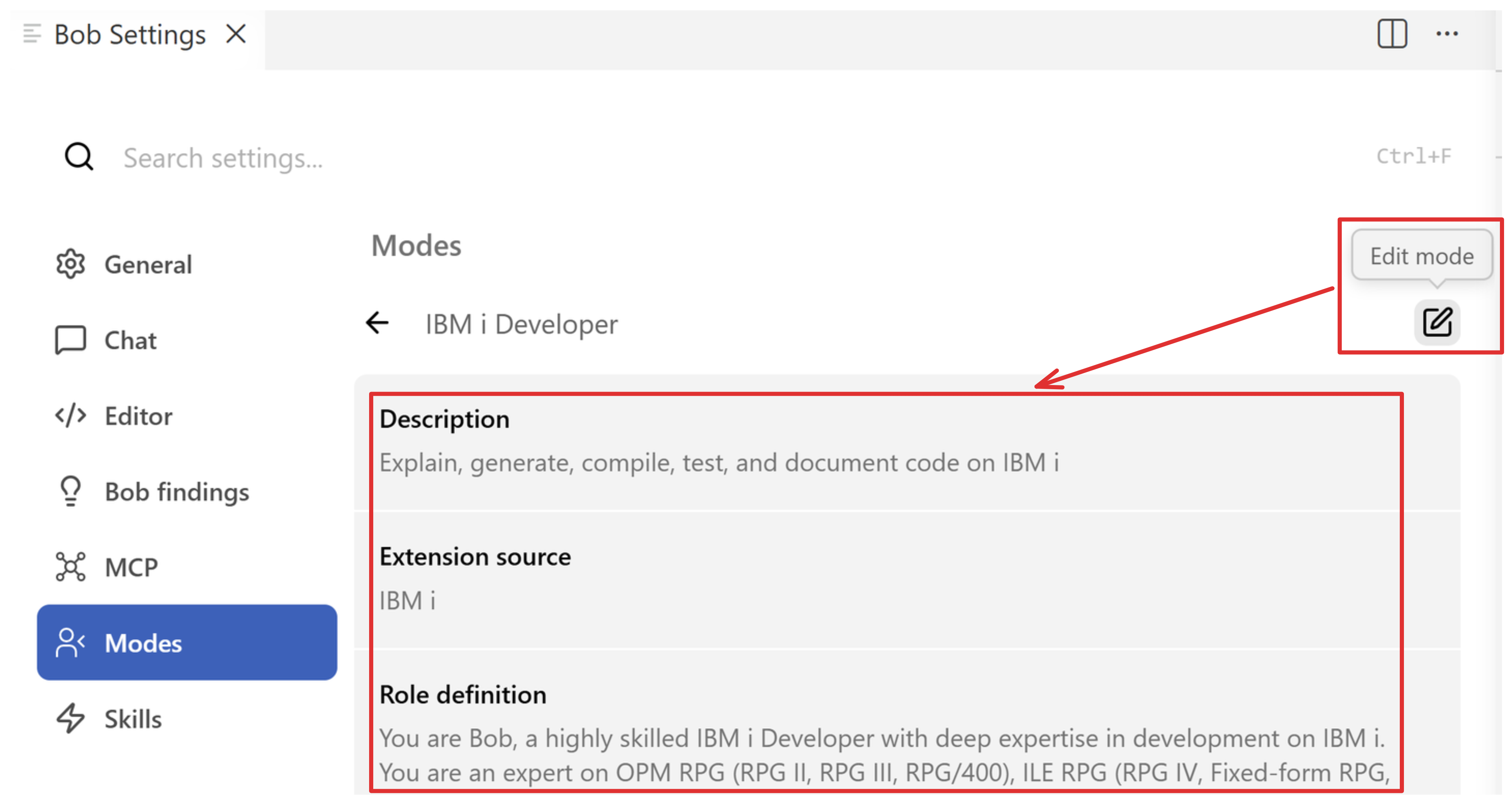
All modes in Bob can be freely customized including the two IBM i modes. Simply navigate to the Bob settings, select the Modes tab, locate the IBM i mode you would like to edit, make the desired changes, and press save. For more details, read more on customizing modes.
Editing a mode is one of the best ways to tailor Bob's general behavior. If you find yourself repeatedly reminding Bob to follow a rule that isn't tied to a particular project, add it as a custom instruction on the mode instead. Bob will apply it automatically on every task whenever the mode is used.
Mode switching and using non-IBM i modes
Bob supports seamless switching from both IBM i Developer and 8IBM i Database* modes to general-purpose modes, such as Plan or Agent, when a task includes non-IBM i activities or broader planning requirements. For tasks involving IBM i applications and assets, IBM i Developer and IBM i Database modes are the recommended modes of operation:
- Agent — The two IBM i modes serve as a replacement for Agent mode whenever tackling IBM i specific use cases as they are better equipped with the appropriate persona, context, and tool access.
- Plan — You can switch to Plan mode for architectural and multi-step planning, or remain in IBM i Developer mode to plan and run the work directly against QSYS and IFS resources.
- Ask — The two IBM i modes should also be used when asking IBM i specific Q&A style questions as they have tools to do IBM i specific documentation retrieval.