Activating your instance
Set up your IBM Bob Enterprise organization by activating your instance and preparing for user and team management.
Get your IBM Bob Enterprise organization up and running by activating your instance and preparing to add team members and configure teams.
Before you begin
You must purchase an Enterprise plan before you can activate your instance.
You can create instances in multiple regions. When you select a region, conversation data and model inference stay within that region. Some administrative data is maintained globally in US East regardless of your region selection. For more information, see Data residency.
If your organization uses firewall restrictions, you might need to configure your firewall to allow access to specific URLs and endpoints. For more information, see Configuring firewall rules for Bob.
Activating your instance
When you subscribe to IBM Bob, you will receive an email with a link to activate your instance. Click the link to access the IBM SaaS console and complete the activation process.
To activate your instance:
Click Assign on the tile for your IBM Bob subscription.
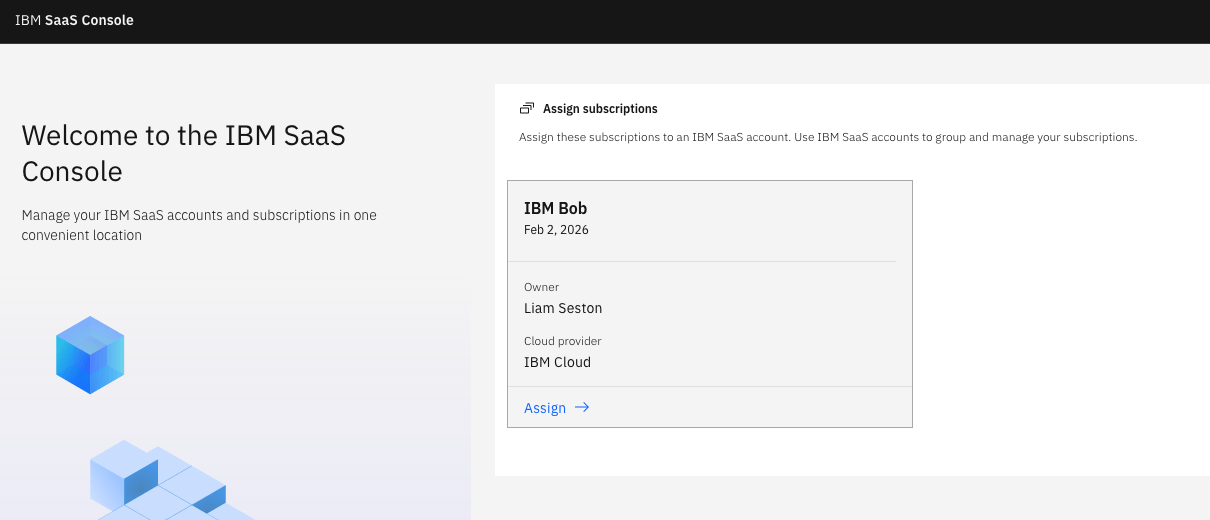
Create a new account IBM SaaS account, or select an existing account you want to apply your subscription to.
On the Set up your subscription page, enter your region and a name for your instance. Click Submit and provision.
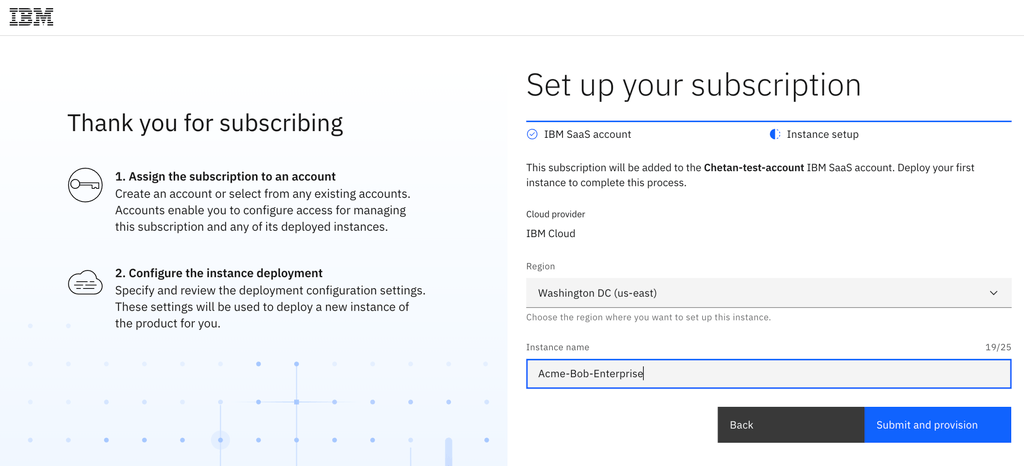
Your instance is now ready. To start adding users, see Managing users and roles.
You must log in with your enterprise account and use the Bob Administration page to add users and manage your team.
Plan overview
Scale IBM Bob across your organization with centralized control. Get enhanced team management capabilities, shared Bobcoin allocation, and dedicated support to help your organization maximize productivity.
Managing users and roles
Add users to your IBM Bob Enterprise organization, assign roles, manage seat allocation, and assign premium packages.