建立和使用技能
建立一個可重複使用的技能,教 Bob 一個可重複的 changelog 條目工作流程,然後明確地呼叫它或讓 Bob 自動啟用它。
技能是一個可重複使用的指令集,教 Bob 一個專業化的、可重複的工作流程。你無需在每個 prompt 中重新輸入相同的格式規則或檢查清單,只需在 SKILL.md 檔案中定義一次工作流程即可。之後,無論你直接呼叫技能還是 Bob 自動啟用,Bob 都會在技能適用時遵循這些指令。
在本教學中,你將建立一個技能,使用 Keep a Changelog 格式向 CHANGELOG.md 檔案新增條目(若檔案不存在則建立)。你用斜線命令明確呼叫技能,然後進行第二次變更,並要求 Bob 記錄它而不提及技能名稱,以觀察 Bob 根據技能描述自動啟用它。
先決條件
要完成本教學,你需要以下內容:
- 如果尚未擁有,請克隆 Galaxium Travels 示範程式碼。
git clone https://github.com/IBM/galaxium-travels- 已開啟 Galaxium Travels 示範程式碼的 Bob IDE。
- 雖然不是必要的,但建議先完成使用 /init 和 AGENTS.md 啟動專案和為 Bob 撰寫有效的提示詞。
建立 changelog 條目技能
開啟聊天介面
點擊導航列旁的 Bob 圖示開啟 Bob 聊天介面,或使用快速鍵 Option + Command + B(macOS)或 Ctrl + Alt + B(Windows)。
使用聊天介面中的模式選擇器切換至 Agent 模式。Agent 模式為 Bob 提供啟用技能和編輯檔案所需的工具存取權限。
開啟 Skills 設定
在 Bob 中建立技能有多種方式。你可以使用使用者介面(UI),或在 Bob 聊天中使用 /create-skill 命令進行引導式設定。
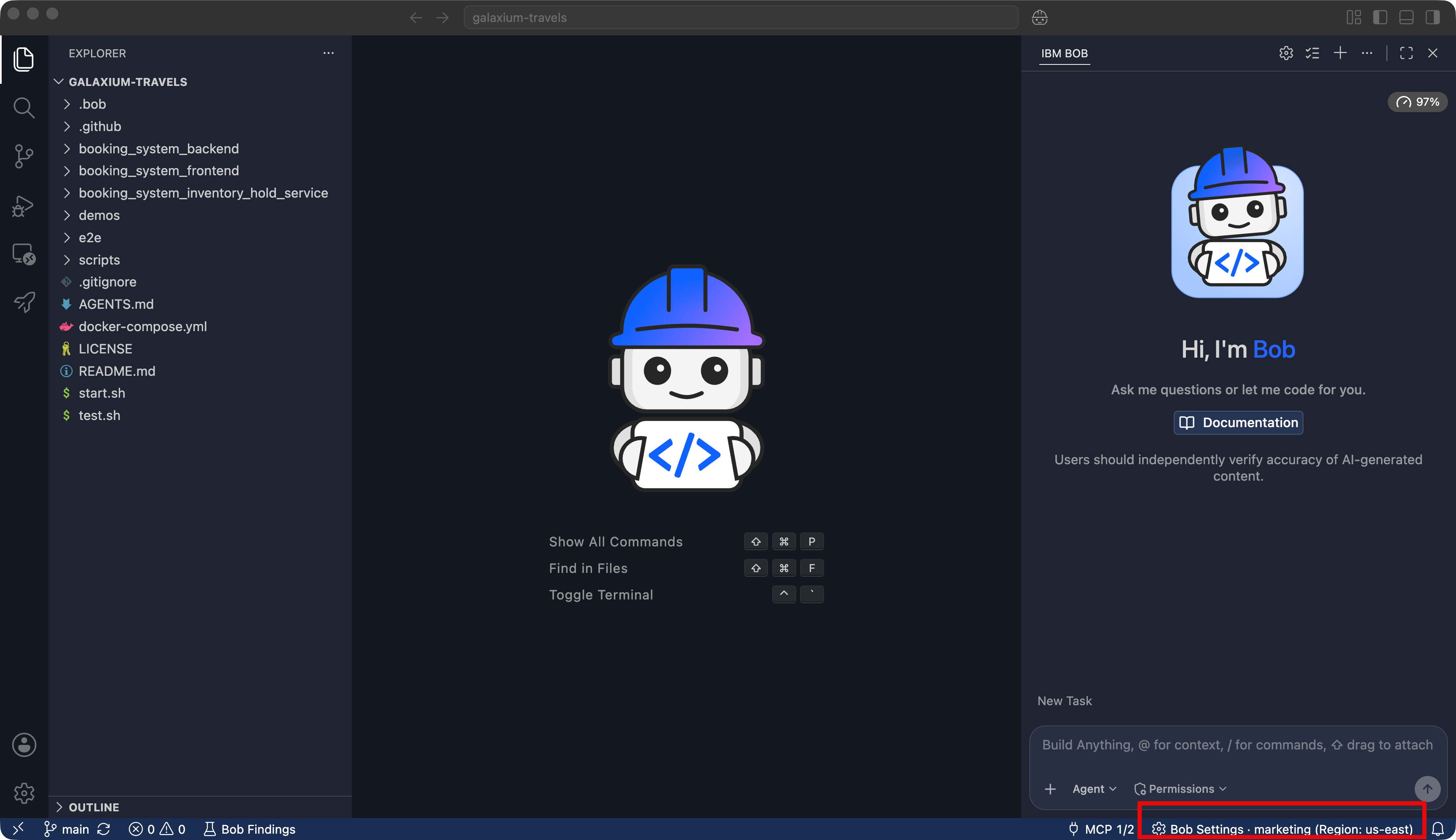
在本教學中,你使用 Bob 設定中的 Skills 標籤頁來建立技能。
- 在聊天介面下方,點擊 Bob Settings。
- 點擊左側邊欄中的 Skills。
- 點擊 + 按鈕建立新技能。
填寫技能詳細資訊
在技能建立表單中輸入以下值:
| 欄位 | 值 |
|---|---|
| Skill Name | changelog-entry |
| Description | Adds an entry to CHANGELOG.md using the Keep a Changelog format, creating the file if it does not exist, so change history stays consistent and release-ready. |
| Allow Bob to use this skill | 開啟 |
| Scope & Location | galaxium-travels |
Skill Name 是你輸入以直接呼叫技能的內容,例如 /changelog-entry。Description 是 Bob 在你不按名稱呼叫技能時,用於判斷技能是否適用於某個請求而讀取的內容。
當 Allow Bob to use this skill 開啟時,Bob 可以在 prompt 需要時自行使用技能,或者你也可以明確呼叫它。將 Scope & Location 設定為 galaxium-travels 會將技能儲存在專案的 .bob/skills/ 目錄中,這樣 git 會與程式碼一起追蹤它,你的團隊也可以存取它。選擇 Global (all workspaces) 則會將技能儲存在儲存庫外的 ~/.bob/skills/ 中。
在 Skill Instructions 文字方塊中輸入以下內容:
---
name: changelog-entry
description: Adds an entry to CHANGELOG.md using the Keep a Changelog format, creating the file if it does not exist, so change history stays consistent and release-ready.
user-invocable: true
---

Add an entry to CHANGELOG.md using the Keep a Changelog format (https://keepachangelog.com/).

- If CHANGELOG.md does not exist, create it at the project root with this structure before adding an entry:

  # Changelog

  All notable changes to this project are documented in this file.
  The format is based on [Keep a Changelog](https://keepachangelog.com/en/1.1.0/).

  ## [Unreleased]

- Add new entries under the `## [Unreleased]` section, under one of these subheadings: `### Added`, `### Changed`, `### Fixed`, `### Removed`. Create the subheading if it is not already present under `## [Unreleased]`.
- Write each entry as a single bullet point in the imperative mood ("Add", not "Added"), starting with a capital letter, with no trailing period.
- Base the entry on the actual diff, not on the wording of the request. Run `git diff` to review what changed before writing the entry.
- Only edit CHANGELOG.md. Do not stage or commit the change.
點擊 Create。
Bob 將技能儲存至 galaxium-travels/.bob/skills/changelog-entry/SKILL.md。
直接呼叫技能
按名稱呼叫技能,以便查看 Bob 遵循的指令。
進行小幅變更
讓 Bob 進行一個小而低風險的編輯,以便有內容可以記錄:
Add a one-line note to the end of the README.md that says "Powered by IBM Bob."Bob 編輯 README.md。如果出現提示,批准編輯。
使用技能記錄變更
在聊天介面中,輸入 /changelog-entry 並按 Enter,或點擊出現的 /changelog-entry 建議。然後輸入以下 prompt:
Add a changelog entry for this change.Bob 可能會請求使用技能工具和編輯檔案的權限。如果出現提示,批准。Bob 載入 changelog-entry 技能,由於專案沒有 CHANGELOG.md,將其建立,並新增遵循技能中定義格式的條目,類似於:
## [Unreleased]

### Added

- Add "Powered by IBM Bob." note to the end of README.md讓 Bob 自動啟用技能
點擊聊天介面上方的 + 按鈕啟動新任務視窗。
進行第二次變更,並要求 Bob 記錄它,而不提及技能名稱。由於你保持 Allow Bob to use this skill 開啟,Bob 可以從技能描述中識別出它適用並自行啟用。
進行另一個小幅變更
Add a one-line comment above the main heading in README.md that says "Galaxium Travels".如果出現提示,批准編輯。
請求 Bob 記錄變更,而不命名技能
Add an entry to CHANGELOG.md in Keep a Changelog formatBob 識別出請求與 changelog-entry 技能的描述相符,並在你不輸入 /changelog-entry 的情況下啟用它。如果出現提示,批准技能和檔案編輯權限。Bob 以相同格式新增另一個條目。
啟用此設定後,Bob 會在技能(包括 changelog-entry)適用時自動啟用,無需先詢問。
管理你的技能
你建立 changelog-entry 的 Bob 設定中的 Skills 標籤頁,也是你檢視目前和全域工作區中所有可用技能的地方。使用它來檢查工作區已載入的技能,確認技能來自專案(.bob/skills/)還是全域(~/.bob/skills/)位置,以及編輯或刪除技能。
清除
要移除本教學中建立的檔案:
- 在 Bob Settings 中,點擊 Skills,然後刪除
changelog-entry技能。 - 刪除在先決條件中克隆的
galaxium-travels目錄。這也會移除本教學中進行的CHANGELOG.md和README.md編輯。
後續步驟
在本教學中,你學習了技能如何讓你一次定義工作流程,並讓 Bob 一致地應用它,無論你是用 /skill-name 明確呼叫技能,還是讓 Bob 根據描述自動啟用它。
繼續學習新增自訂模式,了解自訂模式如何將角色定義、行為指令和工具存取組合成特定工作的專業化角色。