
Bob Shell v2 leads this month's release
This month's release brings updates to Bob Shell, Bobalytics, and Bob IDE. Bob Shell moves to V2, bringing the V2 agent and harness to the terminal. Bobalytics introduces the Today and Editorial views to make daily activity and broader usage patterns easier to understand. Bob IDE adds focused improvements to MCP connections, edit review, and task management.
Bob Shell v2 brings the V2 agent to the terminal
Bob V2 introduced a shared architecture built around one agent and one harness, with clients providing the interface for each environment. Bob IDE was the first client to move to that foundation. With this release, Bob Shell follows.
This is more than an update to the terminal interface. Shell now runs on the same agent foundation as Bob IDE, bringing Skills, Subagents, and better execution of long-running tasks to terminal sessions.
Use Skills and Subagents from the terminal
Skills package reusable instructions and workflows. A team can capture a release procedure, review checklist, or repository-specific process once and invoke it from Bob Shell when needed.
Subagents let Bob delegate a focused part of a larger task into a separate context. A Subagent can trace an unfamiliar authentication flow or inspect a set of test failures, then return its findings to the main conversation without filling that conversation with every intermediate file read and search.
Both capabilities are useful on longer tasks. Skills give the task an established procedure to follow, while Subagents keep focused investigations separate. The V2 harness helps Bob carry that work through multiple steps more reliably.
Continue work between Bob IDE and Bob Shell
Bob IDE and Bob Shell share task history. Tasks started in Shell appear in the IDE, and /resume in Shell includes tasks started in the IDE.
That makes the choice of client less permanent. You can start in Bob IDE when you want to inspect code and proposed changes visually, then resume the task in Bob Shell when the next step fits a terminal workflow. The task remains available in the IDE when you want to return for review.
For example:
- Start a larger change in Plan in Bob IDE.
- Hand the plan to Agent and let Bob begin the implementation.
- Resume the task from Bob Shell with
/resume. - Invoke a Skill for the team's validation procedure or delegate a focused investigation to a Subagent.
- Reopen the task in Bob IDE to review the resulting changes.
Separate interactive work from automation
Bob Shell v2 makes the distinction between interactive and headless use explicit:
bob chatstarts an interactive, multi-turn terminal session.bob runexecutes a headless task for scripts, pipelines, and other automation.bob mcpmanages MCP server configurations from the command line.
Headless runs can return human-readable output, a single JSON result, or streaming JSON events. Workspace sessions can be listed and resumed by task ID, including the latest session. Limits and tool-group controls let an automated caller set boundaries around a run.
These changes make Bob Shell useful in two different settings: as a conversational client when the IDE is not the right interface, and as an agent interface for repeatable command-line automation.
See what matters in Bobalytics
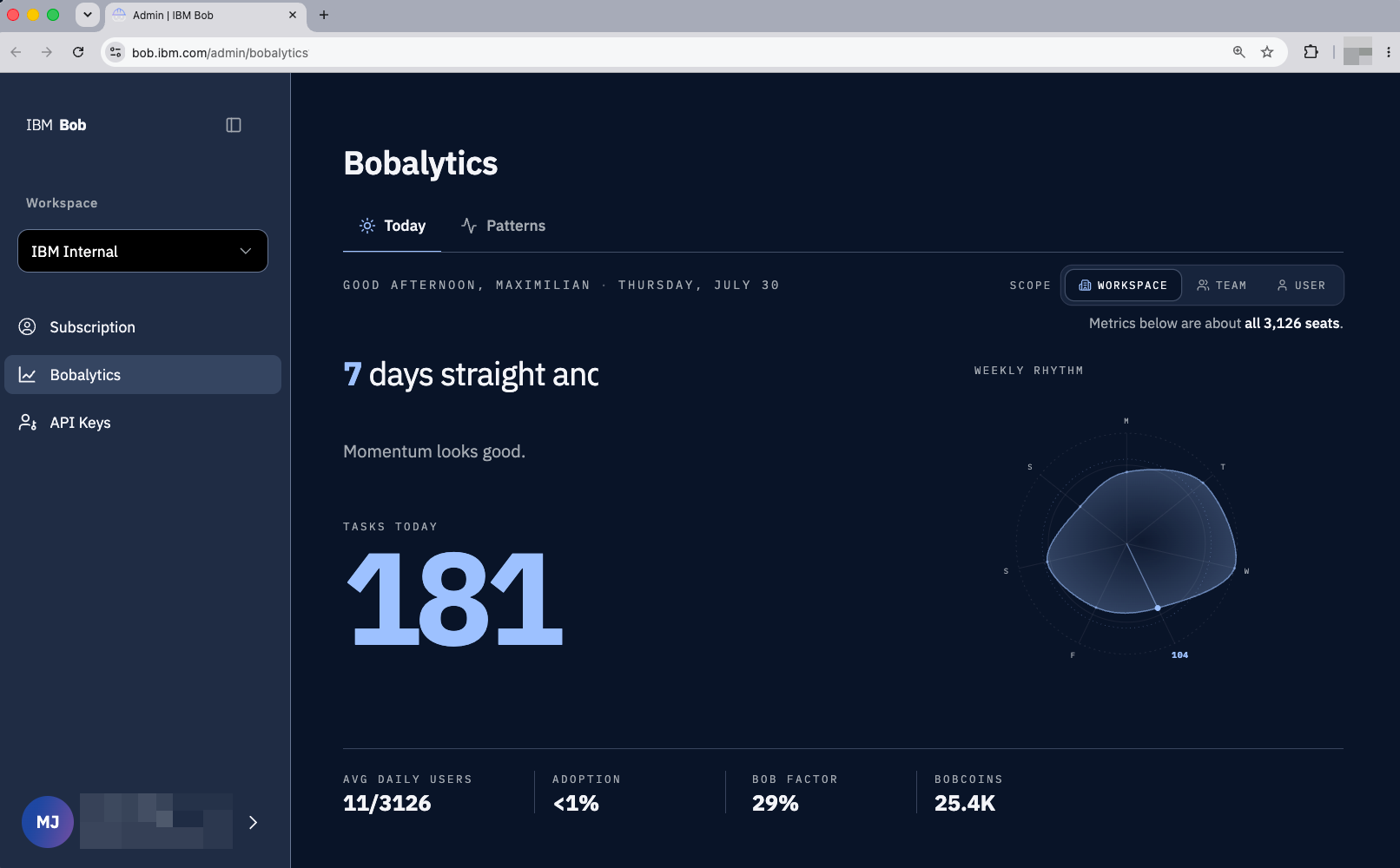
Bobalytics now offers two new ways to read your usage data. The Today view provides an immediate snapshot of your own work with Bob, while the Editorial view draws out notable patterns across the wider organization.
Today is the new Bobalytics landing page. It brings together your tasks, weekly rhythm, and the metrics that matter most, so you can quickly understand your day with Bob.
Editorial, available under the Patterns tab, presents a concise digest of highlights across user, team, and instance views. Instead of comparing each chart yourself, you can use Editorial to see which patterns and shifts stand out, then decide where to look more closely or take action.
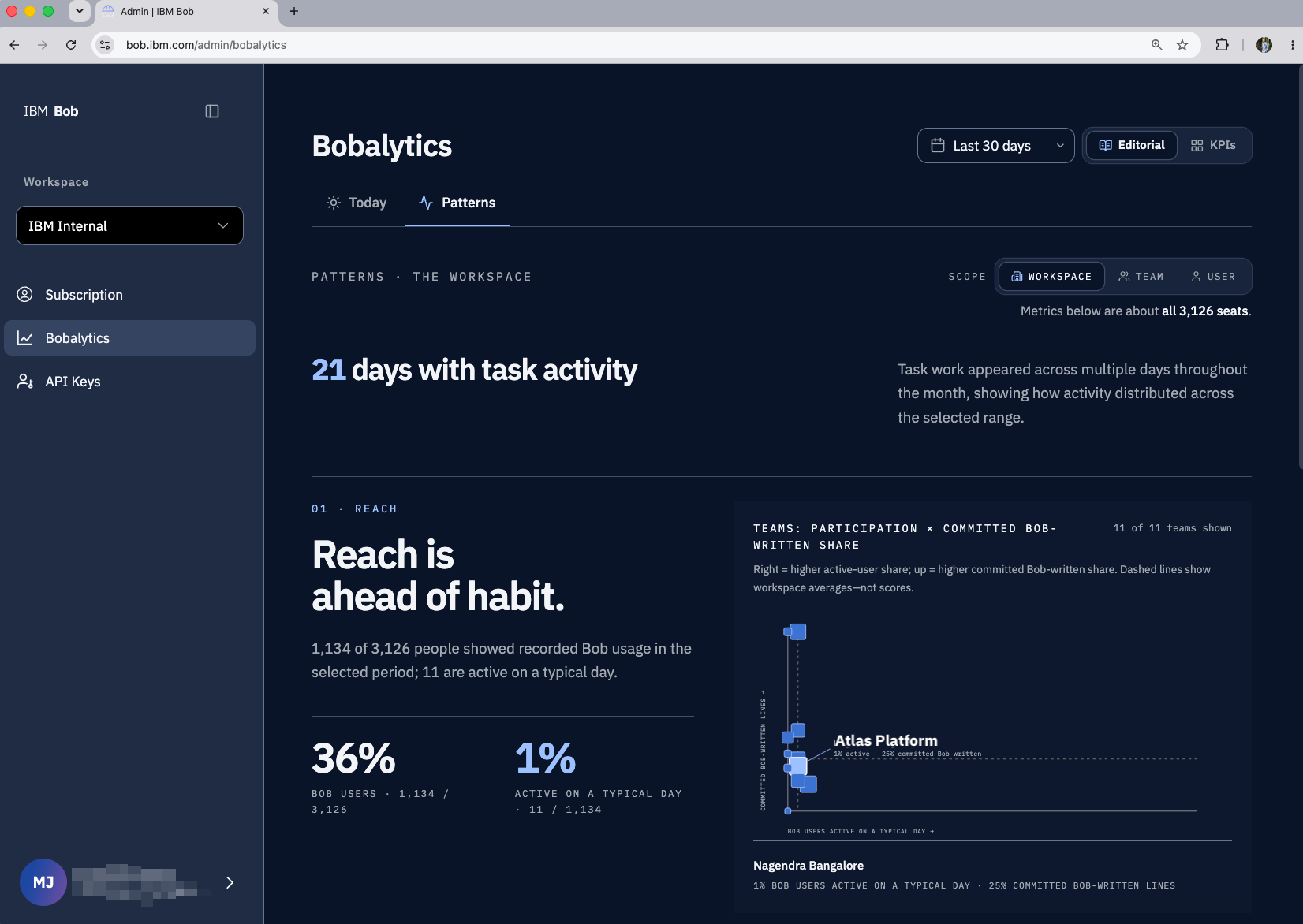
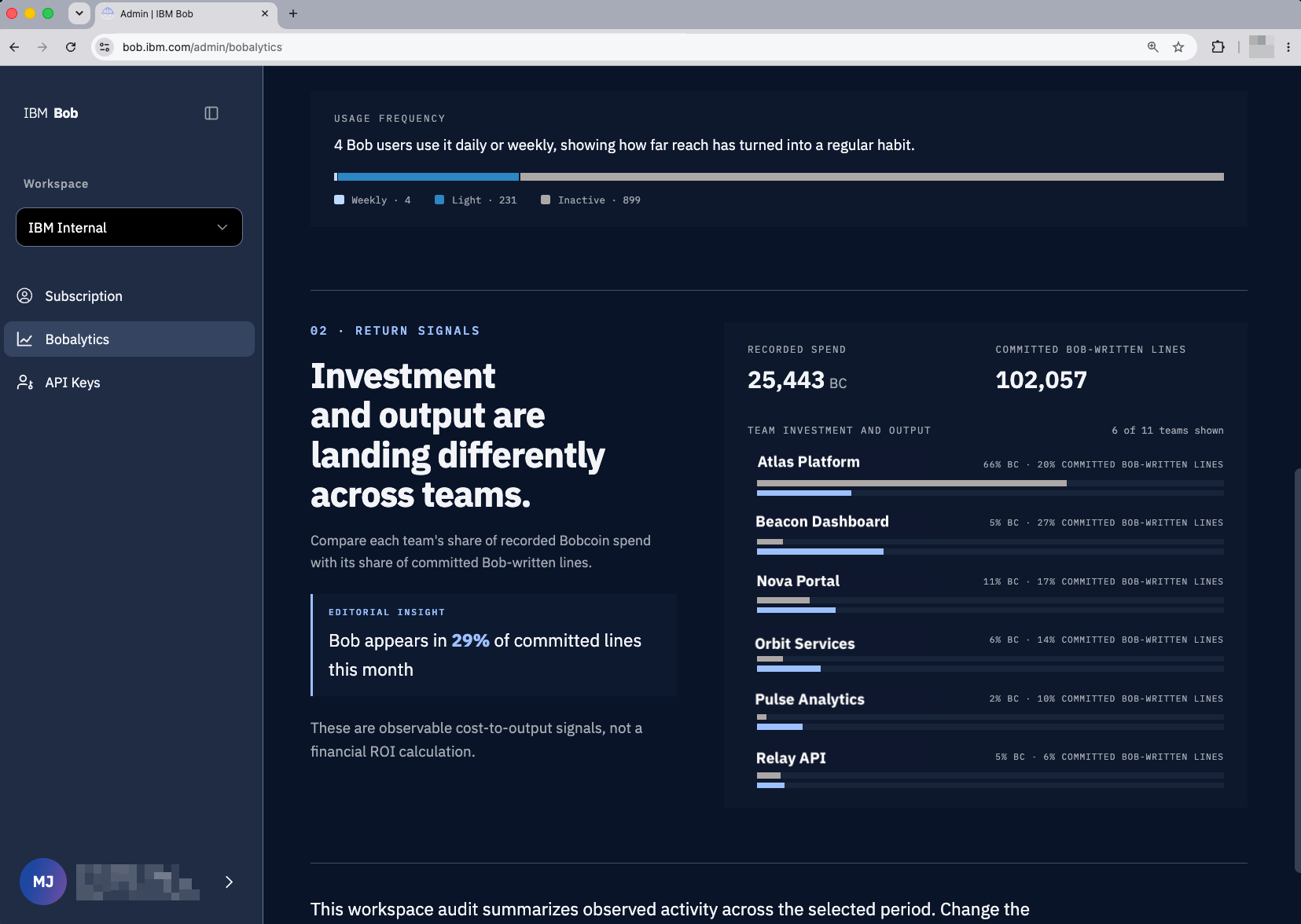
The existing KPI views remain available on the Patterns page for deeper analysis. You can also export data from any Bobalytics view you have access to, across every level and chart.
Focused improvements in Bob IDE
Alongside the Bob Shell v2 release, the August update includes a set of incremental improvements to Bob IDE. They expand what Bob can access through MCP, give you more control over proposed file edits, and make background work easier to follow.
Connect services that require user authorization
Some MCP servers can work with a static credential. Services that act on behalf of an individual user need a different flow: the user needs to see what access is being requested and decide whether to grant it.
Bob IDE now supports OAuth authorization for MCP servers. When a configured server requests authorization, Bob opens the service's consent flow. You sign in to the service, review the request, and authorize the connection without copying a personal token into an MCP settings file.
MCP servers can also expose more than tools:
- Resources through
@mentions. A resource is server-provided context such as an issue, document, schema, or repository object. Type@in the prompt and select the resource you want Bob to use. - Prompts through
/actions. An MCP server can provide a prompt for a task it understands. Type/to find and run the prompt from the conversation.
Suppose an OAuth-enabled project management server exposes an issue as a resource. After authorizing the server, add the issue with @, ask Bob to inspect the relevant code, and move into Plan or Agent once the scope is clear. Authorization remains an explicit step, while the issue becomes part of the working context.
Explore data with interactive charts
Bob can now generate and display interactive charts directly in the chat. Ask Bob to visualize a dataset, then explore the result without leaving the conversation.
Inspect and shape file changes before they land
On a change with a wide surface area, reviewing only after the files have been updated creates avoidable backtracking. A new setting lets you preview Bob's proposed file edits in the editor before they are applied.
The proposal opens as a diff, where you can inspect it alongside the current file. If the approach is right but one line needs adjustment, edit that line directly in the diff and approve the corrected proposal.
These are two related but distinct controls:
- Edit preview changes when Bob's proposed changes are applied. The files remain unchanged while you review the proposal.
- Editing the diff changes the proposal itself. It is useful for a small correction that does not warrant another prompt.
The workflow is to ask Bob for the change, inspect the proposed diff, adjust it if needed, and approve it.

Keep track of work across workspaces
The task browser now lets you browse and reopen Bob tasks from other workspaces. Bob can also send a desktop notification when a background task needs your input and the editor is in the background.
Outputs remain accessible after the conversation as well. Bob-generated HTML artifacts are saved inside the workspace and can be opened in Live Preview. An architecture report or investigation summary therefore lives with the project instead of only inside its task history.
More Bob IDE improvements
- Choose how many days Bob keeps completed tasks before clearing them under Settings > Chat.
- Search your chat history with Cmd/Ctrl+F, with highlighted matches and next/previous navigation.
- Ask searches Bob documentation first when answering questions about Bob features.
- Custom mode rule files are included when modes are exported, imported, installed, or deleted.
- The branch picker is searchable.
- The active team appears in the status bar for users who belong to multiple teams.
Try the latest release
For Bob Shell v2, start a task in Bob IDE and resume it from Shell with /resume. Use a Skill for a repeatable team procedure or ask Bob to delegate a focused investigation to a Subagent.
In Bob IDE, connect an OAuth-enabled MCP server and add one of its resources with @ or run a server-provided prompt with /. Then ask Bob for a code change with edit preview enabled, review the proposal, make any small correction in the diff, and approve it.
Links