Create and use skills
Create a reusable skill that teaches Bob a repeatable changelog-entry workflow, then invoke it explicitly and let Bob activate it automatically.
A skill is a reusable instruction set that teaches Bob a specialized, repeatable workflow. Instead of retyping the same formatting rules or checklist in every prompt, you define the workflow once in a SKILL.md file. Bob then follows those instructions whenever the skill applies, whether you invoke it directly or Bob activates it on its own.
In this tutorial, you create a skill that adds entries to a CHANGELOG.md file using the Keep a Changelog format, creating the file if it does not already exist. You invoke the skill explicitly with a slash command, then make a second change and ask Bob to log it without naming the skill, to see Bob activate it automatically based on its description.
Prerequisites
To complete this tutorial, you need the following:
- If you do not already have it, clone the Galaxium Travels demo code.
git clone https://github.com/IBM/galaxium-travels- Bob IDE with the Galaxium Travels demo code open.
- While not required, consider completing Start a project with /init and AGENTS.md and Write effective prompts for Bob first.
Create a changelog-entry skill
Open the chat interface
Open the Bob chat interface by clicking the Bob icon beside the navigation bar, or use the shortcut Option + Command + B (macOS) or Ctrl + Alt + B (Windows).
Switch to Agent mode using the mode selector in the chat interface. Agent mode gives Bob the tool access it needs to activate skills and edit files.
Open the Skills settings
There are multiple ways to create a skill in Bob. You can use the user interface (UI), or use the /create-skill command in the Bob chat for a guided setup.
In this tutorial, you use the Skills tab in Bob Settings to create a skill.
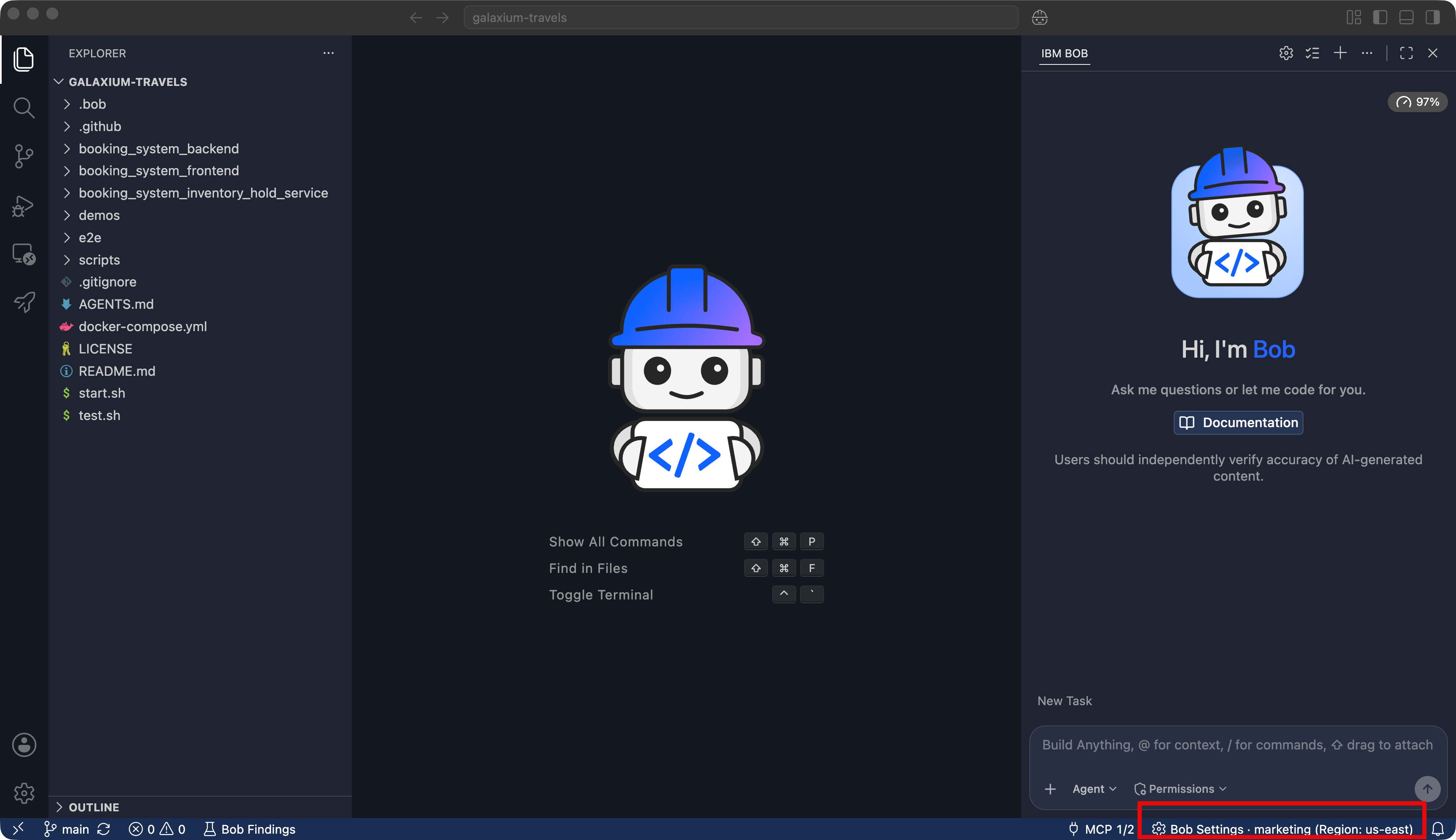
- Under the chat interface, click Bob Settings.
- Click Skills in the left sidebar.
- Click the + button to create a new skill.
Fill in the skill details
Enter the following values in the skill creation form:
| Field | Value |
|---|---|
| Skill Name | changelog-entry |
| Description | Adds an entry to CHANGELOG.md using the Keep a Changelog format, creating the file if it does not exist, so change history stays consistent and release-ready. |
| Allow Bob to use this skill | On |
| Scope & Location | galaxium-travels |
The Skill Name is what you type to invoke the skill directly, for example /changelog-entry. The Description is what Bob reads to decide whether the skill applies to a request when you do not invoke it by name.
When Allow Bob to use this skill is on, Bob can use the skill on its own when a prompt calls for it, or you invoke it explicitly. Setting Scope & Location to galaxium-travels saves the skill in the project's .bob/skills/ directory, so git tracks it alongside the codebase and your team can access it. Choosing Global (all workspaces) instead would save the skill outside of the repository to ~/.bob/skills/.
Enter the following in the Skill Instructions textbox:
---
name: changelog-entry
description: Adds an entry to CHANGELOG.md using the Keep a Changelog format, creating the file if it does not exist, so change history stays consistent and release-ready.
user-invocable: true
---

Add an entry to CHANGELOG.md using the Keep a Changelog format (https://keepachangelog.com/).

- If CHANGELOG.md does not exist, create it at the project root with this structure before adding an entry:

  # Changelog

  All notable changes to this project are documented in this file.
  The format is based on [Keep a Changelog](https://keepachangelog.com/en/1.1.0/).

  ## [Unreleased]

- Add new entries under the `## [Unreleased]` section, under one of these subheadings: `### Added`, `### Changed`, `### Fixed`, `### Removed`. Create the subheading if it is not already present under `## [Unreleased]`.
- Write each entry as a single bullet point in the imperative mood ("Add", not "Added"), starting with a capital letter, with no trailing period.
- Base the entry on the actual diff, not on the wording of the request. Run `git diff` to review what changed before writing the entry.
- Only edit CHANGELOG.md. Do not stage or commit the change.
Click Create.
Bob saves the skill to galaxium-travels/.bob/skills/changelog-entry/SKILL.md.
Invoke the skill directly
Invoke the skill by name so you can see the instructions Bob follows.
Make a small change
Ask Bob to make a small, low-risk edit so you have something to log:
Add a one-line note to the end of the README.md that says "Powered by IBM Bob."Bob edits README.md. Approve the edit if prompted.
Log the change with the skill
In the chat interface, type /changelog-entry and press Enter or click the /changelog-entry suggestion that appears. Then, enter the following prompt:
Add a changelog entry for this change.Bob may ask for permission to use skill tools and to edit files. Approve if prompted. Bob loads the changelog-entry skill, creates CHANGELOG.md since the project does not have one, and adds an entry that follows the format defined in the skill, similar to:
## [Unreleased]

### Added

- Add "Powered by IBM Bob." note to the end of README.md
Verify the entry
Ask Bob to show you the changelog.
Show me CHANGELOG.mdThe entry matches the changelog entry Bob generated in the previous step.
Let Bob activate the skill automatically
Start a new task window by clicking the + button above the chat interface.
Make a second change and ask Bob to log it without mentioning the skill by name. Because you left Allow Bob to use this skill on, Bob can recognize from the skill's description that it applies and activate it on its own.
Make another small change
Add a one-line comment above the main heading in README.md that says "Galaxium Travels".Approve the edit if prompted.
Ask Bob to log the change, without naming the skill
Add an entry to CHANGELOG.md in Keep a Changelog formatBob recognizes that the request matches the changelog-entry skill's description and activates it without you typing /changelog-entry. If prompted, approve the skill and file-edit permissions. Bob adds another entry in the same format.
With this setting on, Bob automatically activates skills, including changelog-entry, whenever they apply, without asking first.
Manage your skills
The Skills tab in Bob Settings, where you created changelog-entry, is also where you view every skill available in the current and global workspace. Use it to check the workspace's loaded skills, confirm whether a skill comes from the project (.bob/skills/) or global (~/.bob/skills/) location, and edit or delete a skill.
Clean up
To remove the files created in this tutorial:
- In Bob Settings, click Skills, then delete the
changelog-entryskill. - Delete the
galaxium-travelsdirectory cloned in the prerequisites. This also removesCHANGELOG.mdand theREADME.mdedits made in this tutorial.
Next steps
In this tutorial, you learned how skills let you define a workflow once and have Bob apply it consistently, whether you invoke the skill explicitly with /skill-name or let Bob activate it automatically based on its description.
Advance to Add a custom mode to learn how custom modes combine a role definition, behavioral instructions, and tool access into a specialized persona for a specific job.